Lead Attribution 101: How to Track Every Enquiry
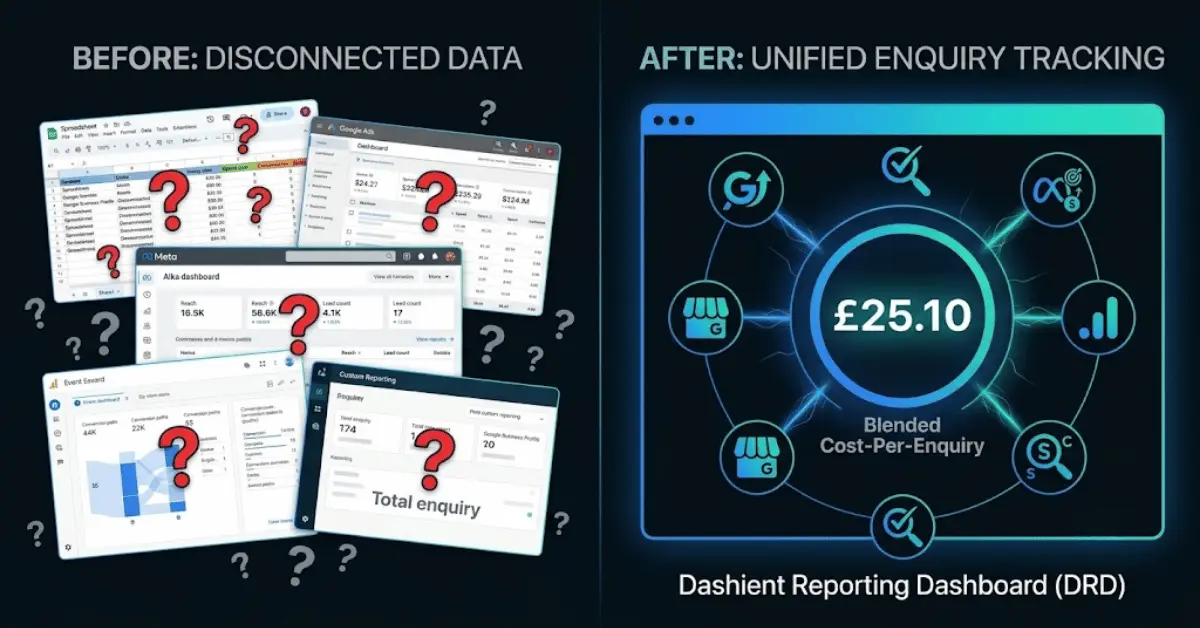
To track every enquiry, you need lead attribution — the process of connecting each call, form submission or booking back to the exact marketing channel that produced it (SEO, PPC, Google Business Profile, or paid social), rather than relying on a single platform's self-reported numbers. Most small businesses lose this picture because their data sits in five different places: Google Ads, Meta Ads, GA4, Search Console, and Google Business Profile — and none of these talk to each other by default.
In this guide, we'll walk through what lead attribution actually means, why it matters, a simple framework for tracking every enquiry back to its real source, and how a unified reporting dashboard removes the guesswork entirely.
What Is Lead Attribution?
Lead attribution is the practice of identifying which marketing touchpoint — an ad, an organic search result, a Google Business Profile listing, or a referral — actually led to a lead. It's the backbone of marketing attribution 101: before you can decide where to spend your next pound, you need to know where your last pound actually worked.
Without proper attribution, most businesses default to 'last-click' reporting, crediting whichever channel the customer interacted with right before converting. This is misleading. A customer might discover you through an organic blog post (SEO), see a retargeting ad a week later (PPC), then finally call after checking your Google Business Profile. Last-click attribution would give 100% of the credit to the last touch and ignore everything that built the enquiry in the first place.
Why Tracking Enquiries Across SEO, PPC & Local Listings Matters
If you're investing in both SEO and PPC, along with a Google Business Profile for local visibility, you're generating leads from at least three different directions. Without attribution, you can't answer simple but critical questions:
- Is your SEO spend actually producing enquiries, or just traffic?
- Is PPC generating new leads, or just capturing people who were going to convert anyway?
- Is your Google Business Profile quietly driving most of your calls?
These aren't small questions — they determine where your next month's budget should go. Getting this wrong means cutting a channel that was actually working, or doubling down on one that wasn't.
How to Track Every Enquiry: A Simple Framework
1. Connect all your data sources
Start by pulling data from every channel that could produce an enquiry: Google Ads, Meta Ads, GA4, Google Search Console data (for organic performance), and your Google Business Profile insights. Each of these lives in a separate login by default, which is exactly why most businesses never get a full picture.
2. Match enquiries back to their real source
Every enquiry — a phone call, a form submission, a booking — needs to be tagged with where it actually came from. This means going beyond last-click and looking at the full journey where possible.
3. Remove last-click bias with a blended view
Instead of judging each platform by its own self-reported numbers (which platforms are naturally biased to inflate), calculate a blended cost-per-enquiry across all channels combined. This gives you one honest number to compare against, rather than five conflicting ones.
4. Review regularly and reallocate budget with confidence
Attribution isn't a one-off task — it's a habit. Reviewing blended cost-per-enquiry monthly means you can shift budget toward what's working and away from what isn't, based on evidence rather than a hunch.
What Is a Marketing Reporting Dashboard and Why Every Agency Needs One
Doing the above manually — exporting data from five platforms, cross-referencing enquiries, and recalculating blended cost-per-enquiry every month — is realistic for a data analyst, but not for a busy business owner or even most agencies. A marketing reporting dashboard automates this by pulling every channel into one live view, so attribution becomes something you check in a few minutes rather than rebuild from scratch each month. It's why more agencies are adopting one as standard reporting infrastructure, rather than exporting yet another end-of-month spreadsheet.
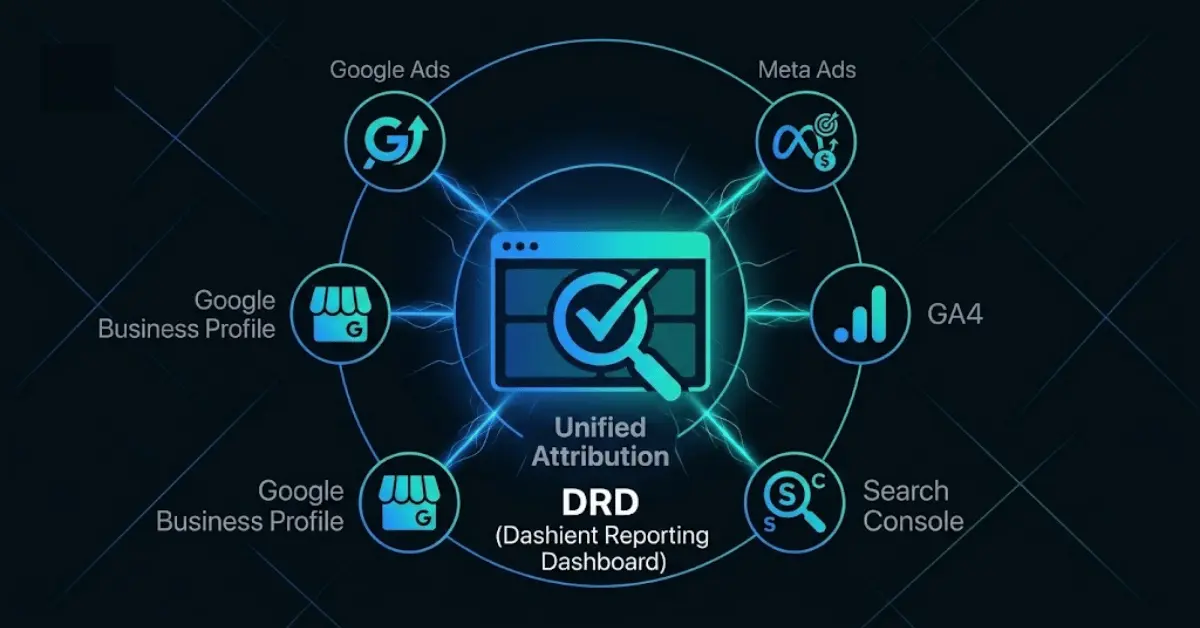
Meet the Dashient Reporting Dashboard (DRD)
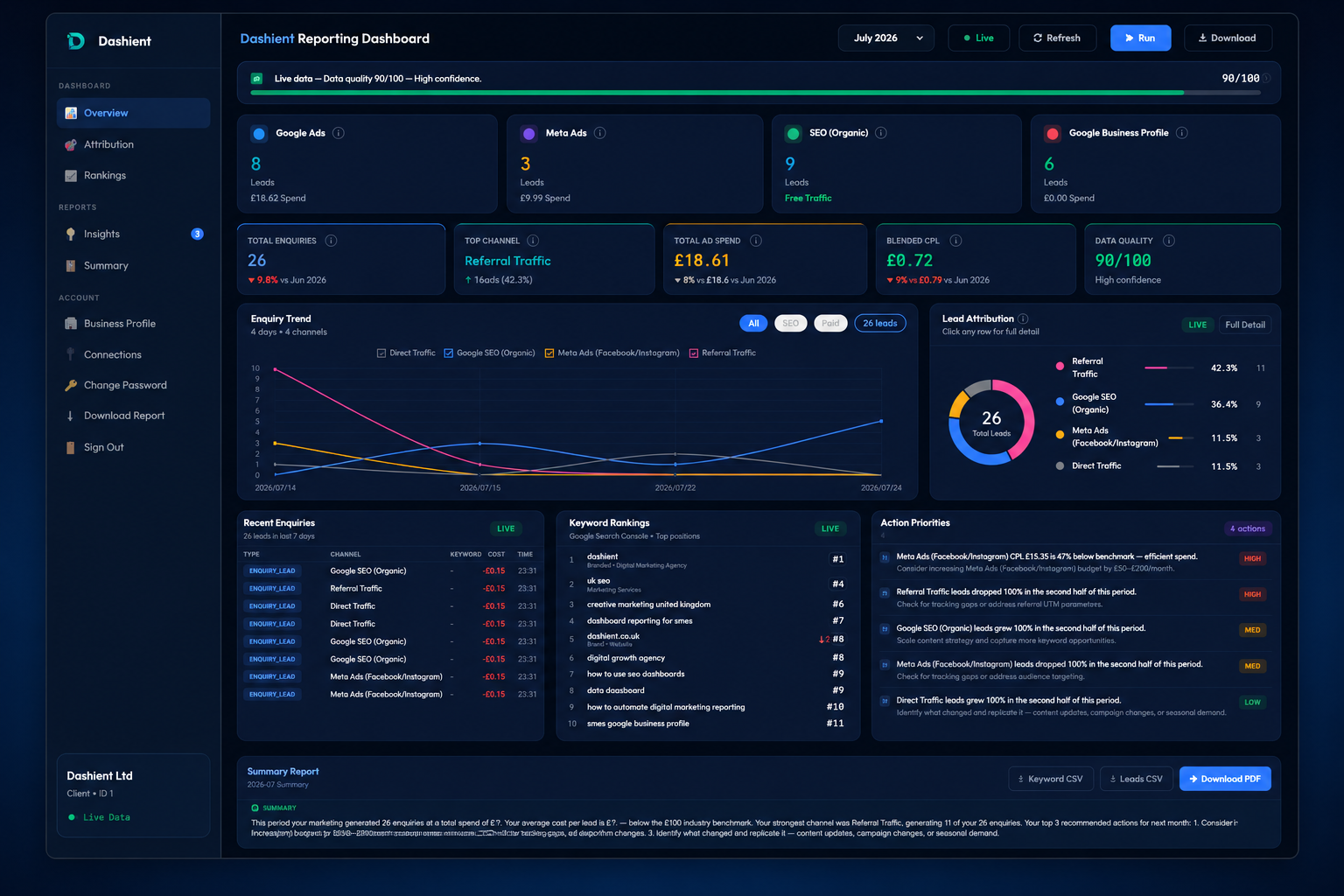
The Dashient Reporting Dashboard (DRD) is a lead attribution and marketing reporting tool built specifically for UK service businesses. It unifies your ad spend, organic search, local presence and enquiries in one live view, so you finally know which marketing drives leads — and which channels are quietly wasting your budget.
The Dashient Reporting Dashboard (DRD) pulls Google Ads, Meta Ads, GA4, Search Console and Google Business Profile into one dashboard, ties every one of those five sources back to your real enquiries — calls, form submissions, and bookings — and shows you a single, honest number: blended cost-per-enquiry, by channel. No more guessing. No more last-click bias. No more agency reports that only show the metrics that flatter the agency.
What DRD actually shows you:
- Which of your five channels is genuinely producing enquiries, and which is riding on the credit of another.
- Your true cost-per-enquiry, blended across every channel — not the misleading per-platform CPC.
- Enough clarity to make a 30% budget cut or a 30% budget increase with confidence, instead of a guess.
Not just for local businesses: any UK SME spending on Google and Meta who can't confidently say which channel is actually paying for itself needs this — ecommerce, SaaS, clinics, professional services, multi-location retailers, all of it.
Related Reading
- Local SEO Guide for UK Service Businesses
- Google Ads Cost for UK Service Businesses in 2026
- Google Business Profile Not Showing in the Map Pack? Here's Why
Frequently asked questions
Final Thoughts
Tracking every enquiry starts with understanding lead attribution — and ends with having a single source of truth for what's actually working across SEO, PPC and local search. If manually piecing together five platforms sounds like more admin than insight, the Dashient Reporting Dashboard was built to do exactly that — automatically, and in one place.