Why Your Google Business Profile Isn't Showing in the Map Pack

You did everything right. Verified your Google Business Profile. Filled in the address, the phone number, the opening hours. And yet when you search for your own business — even by name — you're nowhere near the map pack.
Meanwhile, the phone isn't ringing. The enquiry form is quiet. Every day you're invisible on Google is a day your competitors — the ones sitting in that map pack — are getting the calls that should've been yours. That's the real cost here: it's not just a ranking problem, it's a leads problem.
I've diagnosed this for dozens of UK service businesses, and the answer is almost always one of seven things. They're listed here in the order they're most often the actual problem, so you can work down the list without wasting time on the wrong fix.
Quick answer: the most common causes, in order, are (1) proximity radius, (2) wrong primary category, (3) inconsistent NAP, (4) too few reviews, (5) weak website local SEO, (6) category saturation, and (7) a hidden suspension. Full breakdown and fixes below.
1. You're outside Google's proximity radius (the biggest single reason)
Google's local algorithm strongly favours businesses near the searcher. If someone searches "plumber near me" from a postcode 8 miles from your registered address, and there are ten plumbers within 2 miles of them, you almost certainly won't appear — even if your profile is technically stronger than theirs.
Test: search for your primary keyword + your town/city name explicitly ("plumber Croydon" instead of "plumber near me"). If you appear in the results, the proximity radius is the problem. If you still don't appear, keep reading.
Fix: you can't move the searcher. You can extend your reach by adding well-optimised service-area pages on your website targeting the towns you cover, plus setting your Google Business Profile service area to cover those postcodes.
2. Your primary category is wrong or too broad
Categories are how Google decides which searches you're eligible to appear in. "Plumber" is a category. "Emergency plumber service" isn't. If you're a plumber but your primary category is "Contractor" or "Home Services", you're competing in a huge, blurry pool — and losing.
Test: open your GBP and check your primary category. Compare it with your top three competitors' primary categories (search their names — the category shows in the sidebar).
Fix: primary category should match your exact main service. Use the most specific one Google offers. Additional categories can be broader.
3. Your NAP is inconsistent across the web
NAP = Name, Address, Phone. Google cross-references your GBP against dozens of directories — Yell, Thomson Local, industry-specific ones. If your listings show slight variations (Ltd vs Limited, Street vs St, old phone number on an old directory), Google's confidence in your listing drops, and confidence directly affects local ranking.
Test: search your business name + city and check the top ten results for NAP consistency. Note any variations.
Fix: manually correct or claim each inconsistent listing. Focus on the top 15–20 UK directories. This is grunt work but genuinely moves rankings.
4. You have too few reviews vs your competitors
The map pack rewards volume and freshness of reviews, not just star rating. A business with 4.9 stars and 15 reviews will consistently lose to a business with 4.7 stars and 120 reviews.
Test: count reviews on the three businesses that DO appear in the map pack for your target keyword. That's roughly the volume you're competing against.
Fix: implement a structured post-service review request. Simple text or email template that goes out after every completed job. Ask for the review before the invoice is paid — timing matters. Aim for 3–5 new reviews per month at a minimum.
5. Your website's local SEO isn't backing up the profile
Your Google Business Profile doesn't operate in isolation. Google looks at your website too — do you have location-relevant content, LocalBusiness schema, service pages that mention the areas you cover? If your GBP says you're a plumber in Manchester but your website barely mentions Manchester, Google's confidence in the local relevance is lower.
Test: google site:yourwebsite.co.uk + your primary city. How many pages come back mentioning that city meaningfully?
Fix: at minimum, your homepage, contact page and top service pages should reference your primary service area explicitly. Add LocalBusiness schema. Consider adding a dedicated /areas-we-serve page if you cover multiple towns.
6. You're in a saturated category with strong competition
Some categories are brutally competitive — "dentist near me" in central London, "plumber" in Manchester city centre, "restaurant" anywhere. In these markets, the top three map pack results are established businesses with hundreds of reviews and years of local authority. New entrants can't easily displace them.
Test: look at the top three map pack results for your primary keyword. How many reviews does each have? How long has each been established?
Fix: compete on more specific terms. Instead of "dentist near me", win "emergency dentist [neighbourhood]" or "invisalign provider [town]". These are less contested and often produce better-fit enquiries anyway.
7. You have a suspension or soft-ban you didn't know about
This is rarer but frustrating when it happens. Google Business Profile can suspend or "soft-ban" listings for a variety of reasons — often related to business category, virtual office addresses, keyword stuffing in the business name, or reports from competitors. A soft-ban means your profile is technically live but doesn't appear in most searches.
Test: if you've tried the first six fixes and still see nothing, log into your GBP and check for any notifications or warnings. Also search for your business name in an incognito browser — if it doesn't appear even by exact name, you're likely soft-banned.
Fix: contact Google Business Profile support directly. Be prepared to prove your business is legitimate (Companies House number, utility bill, business bank account statement).
The Dashient Reporting Dashboard (DRD): Multi-Source Lead Attribution for UK SMEs
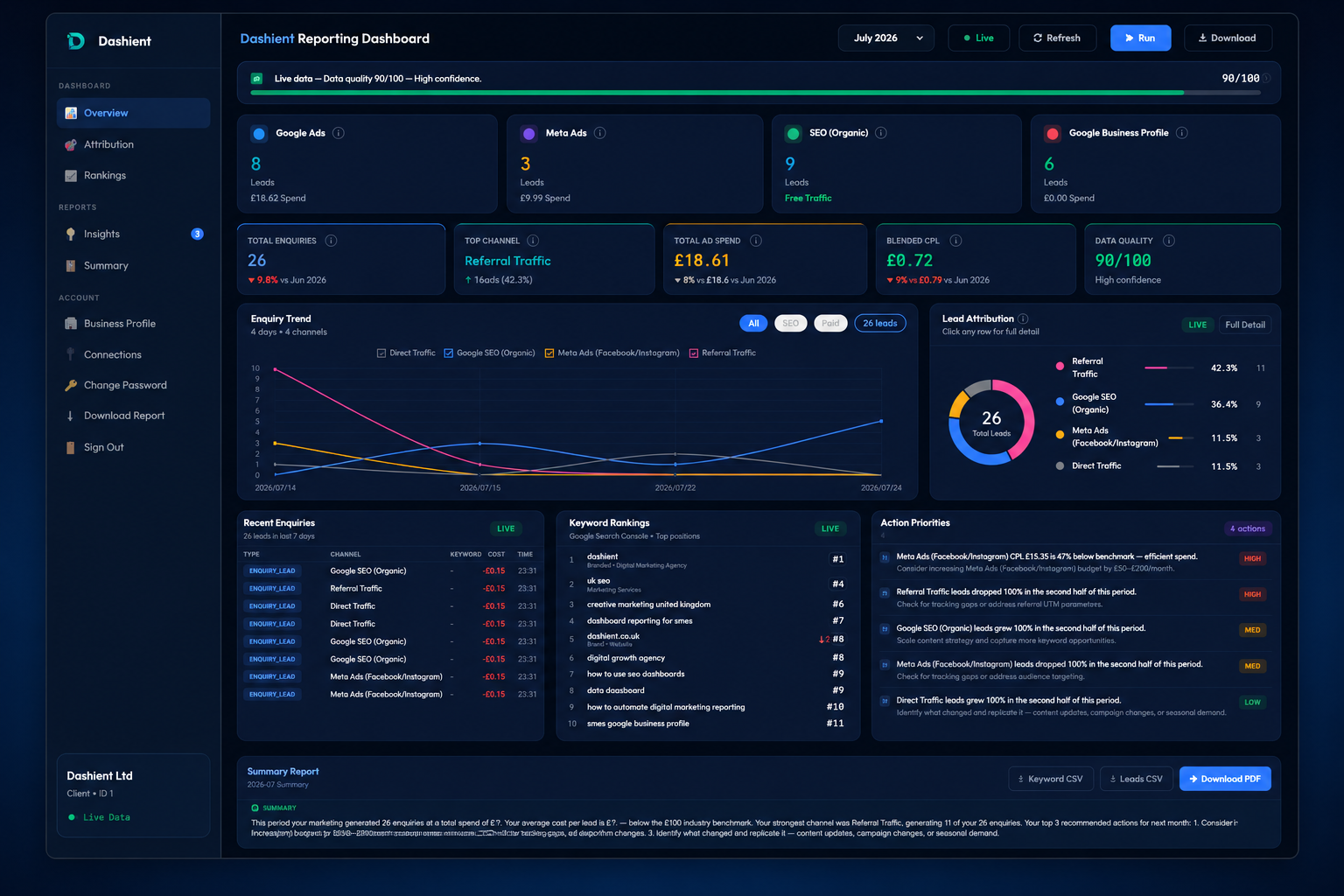
The Dashient Reporting Dashboard (DRD) pulls Google Ads, Meta Ads, GA4, Search Console and Google Business Profile into one dashboard, ties every one of those five sources back to your real enquiries — calls, form submissions, bookings — and shows you a single, honest number: blended cost-per-enquiry, by channel.
No more guessing. No more last-click bias. No more agency reports that only show the metrics that flatter the agency.
What DRD actually shows you:
- Which of your five channels is genuinely producing enquiries, and which is riding on the credit of another.
- Your true cost-per-enquiry, blended across every channel — not the misleading per-platform CPC.
- Enough clarity to make a 30% budget cut or a 30% budget increase with confidence, instead of a guess.
Important: DRD isn't just for local trades. Everything above this section was about local service businesses because that's where Google Ads CPC data is easiest to illustrate. But the attribution problem DRD solves — five disconnected channels, no single source of truth, last-click reporting hiding the real picture — hits every UK SME running paid and organic marketing together: ecommerce, SaaS, clinics, professional services, multi-location retailers, all of it. If you're spending money to be found on Google and Meta and you can't confidently say which channel is actually paying for itself, DRD is built for you.
How to diagnose which one is affecting you
Work through this checklist in order:
- Does your business appear when you search for its exact name in an incognito browser? If no → go to #7 (suspension).
- Does your business appear when you add your town to the search? If no → go to #6 (saturation) or #2 (category).
- Does your business appear for one primary keyword but not others? → #2 (category) or #5 (website support).
- Do your top three competitors have significantly more reviews? → #4 (reviews).
- Do you find NAP inconsistencies across UK directories? → #3 (NAP).
- Are you appearing only when searchers are physically close to your address? → #1 (proximity).
Most UK service businesses have two or three of these problems simultaneously. Fix them in order #1 to #3 first and rankings usually improve within 4–8 weeks.
What "invisible on Google" is actually costing you
It's easy to treat this as a technical checklist and lose sight of what's actually happening: every week you're missing from the map pack, someone searching for exactly what you offer — right now, ready to book — is calling a competitor instead. Not because that competitor does better work. Just because Google showed their name and not yours.
That's the part most business owners underestimate. A map pack fix isn't really an "SEO project" — it's closing a leak in your pipeline that's been costing you real jobs, every single week, for as long as it's gone unfixed. The businesses that treat this seriously — fixing category, NAP, reviews and on-site signals together, rather than picking at one — are usually the ones that show up consistently and never have to think about it again.
Frequently asked questions
What to do next
If you've read this and identified two or three likely culprits, work through the fixes in the order above. Most of them are gruntwork — NAP consistency, category refinement, review generation — but they compound, and every week you delay is another week of enquiries going to someone else.
At Dashient, our Local SEO service covers all of this systematically: GBP audit and optimisation, NAP consistency work across UK directories, structured review generation, and the on-site local SEO signals that back it all up — so you stop losing local searches to competitors and start showing up where the enquiries actually happen. Book a free audit if you'd like us to run this for your business.