Why Two Businesses With Similar Google Rankings Generate Different Numbers of Leads
Google rankings not generating leads is a common frustration. Two businesses can rank in the same position and get very different results, because a ranking only decides visibility. Leads depend on who clicks, what they find and how you count the outcome. This guide explains each step and how to measure what really drives enquiries.
Why Does Ranking Position Not Equal Leads?
A ranking is a position, not a result. It decides where you appear, not whether people click, trust you or get in touch. Traffic is also not the same as leads. Traffic is a visit. A lead is an enquiry, such as a call, a form or a direction request.
What Happens Before the Click?
• Title and description: do they match what the searcher wants?
• Map pack and local results: are you visible there too?
• Reviews and ratings: do you look trustworthy at a glance?
• Brand recognition: do people know your name?
Two listings in the same position can earn very different click numbers.
Are All Rankings the Same?
No. Search intent matters. Someone searching "emergency plumber near me" wants to hire. Someone searching "how does a boiler work" wants to learn. Ranking well for research terms brings readers, not customers. Branded searches (people who already know you) also behave differently from non-branded ones.
What Happens After the Click?
Once a visitor lands, your page must answer three questions fast: can you help, can I trust you, and what do I do next? Check these:
• A clear call to action, such as a visible phone number or short form.
• Trust signals, such as reviews, accreditations and real photos.
• A fast, easy mobile experience. This is about user experience, not a ranking claim.
Local Businesses: Map Pack, Reviews and Calls
Many local customers call or ask for directions straight from your Google Business Profile, without visiting your site. If you only track website forms, you miss them. Strong local SEO covers your profile and your site together.
Are You Counting Leads the Same Way?
One business counts every form fill. Another counts only genuine enquiries. Spam, duplicates and wrong-fit messages can make one look far better than the other. Count qualified leads, not just submissions. Our guide to lead attribution explains how to trace each lead to its source.
A Simple Example (Fictional)
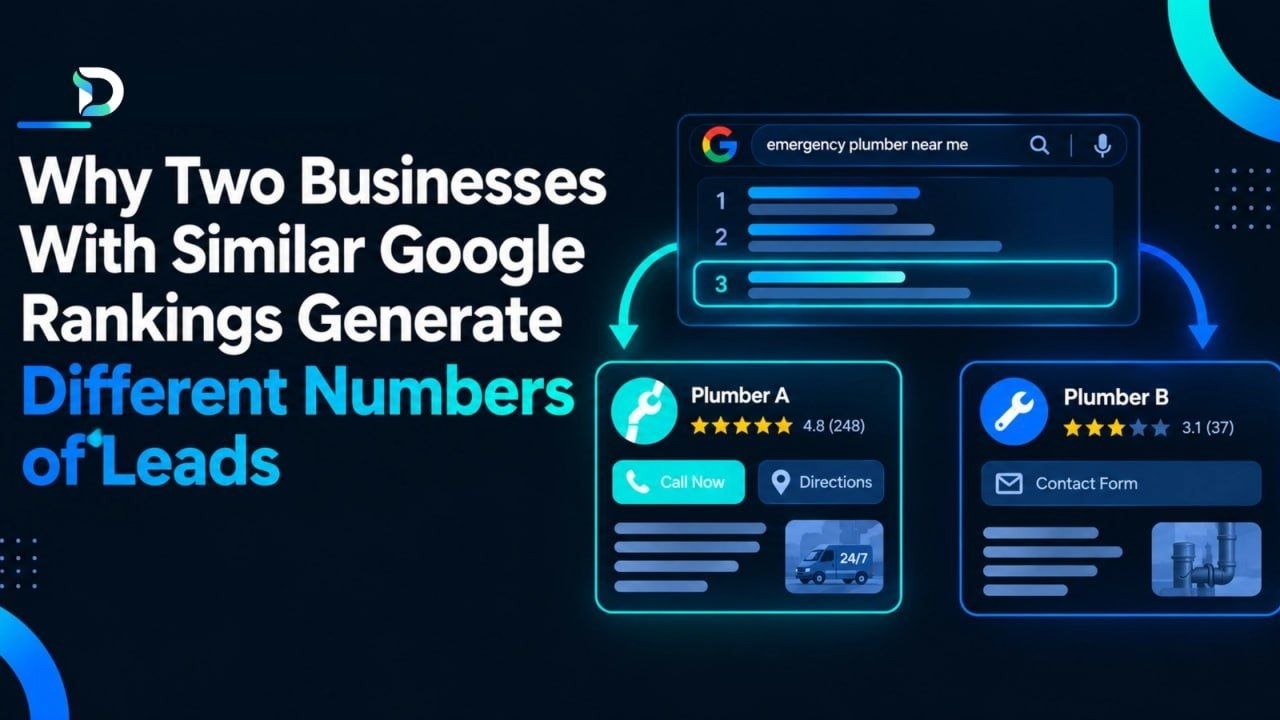
Two plumbers both rank third for "emergency plumber" in the same town. Plumber A has strong reviews, a phone number at the top of a fast mobile page, and tracks calls and genuine enquiries. Plumber B has few reviews and a long contact form, and counts every form fill, including spam. Plumber A gets more real enquiries and sees them. Plumber B gets fewer and cannot tell which are real. The ranking is identical. The results are not.
How to Measure What Is Really Driving Leads
-
Define what counts as a lead.
-
Track the source of every enquiry, including calls.
-
Filter out spam and duplicates.
-
Track qualified leads and cost per qualified lead.
This is how you answer "how do I know where my customers come from?" The Dashient Reporting Dashboard is a lead attribution and marketing reporting tool for UK service businesses. It connects Google Ads, Meta Ads, GA4, Search Console and Google Business Profile, and splits enquiries by source and type: forms, click-to-call taps and direction requests. Genuine-lead classification and spam filtering keep the data clean. The Professional plan adds U-shaped attribution, which shows which channels start and close your leads.
Setup usually takes 1–3 hours and the team does it for you. See how it works. Every plan has a 30-day free trial with no card required.
| Plan | Price | Key features |
|---|---|---|
| Starter | £49/month | 1 business, all 5 sources, genuine-lead classification, monthly PDF, leads CSV |
| Professional | £99/month | Adds U-shaped attribution, weekly reports, lead manager, up to 3 businesses |
| Agency | £199/month | Adds up to 10 client dashboards and priority support |
All prices exclude VAT. See the dashboard plans page. Our SEO services, Google and Meta ads management and SEO pricing in the UK guide can help you act on what you find, and lead tracking software UK covers the setup.
Also From Dashient: ScopeCheck
Dashient also runs ScopeCheck, a tool for UK homeowners comparing trade quotes. You add 2–5 quotes for the same job, and it shows what each includes, what is missing and what to ask. There is a free preview with no sign-up.
Frequently Asked Questions
Why do two websites with the same ranking get different numbers of leads?
Ranking decides visibility. Clicks, search intent, page experience, trust and how leads are counted decide results.
Why am I ranking but not getting enquiries?
Common causes are the wrong keywords, weak listings, unclear pages, little trust and untracked calls. Check each step from search result to enquiry.
Does ranking higher always mean more leads?
No. Higher visibility can help, but only if the right people click and your page turns them into enquiries.
How do I measure leads from SEO?
Define a lead, track its source, filter spam and track qualified leads. Include calls and direction requests, not just forms.
Final Thoughts
A ranking is only the start. Leads come from the right clicks, a page that builds trust and honest counting. Measure the whole journey, and you will know what is really working.
Ready to see where your enquiries really come from? Start your free trial for 30 days, no card required. Already a user? Sign in. Want expert help with SEO and ads? Book Your Free Growth Audit today.